> ## Documentation Index
> Fetch the complete documentation index at: https://evalgate.com/docs/llms.txt
> Use this file to discover all available pages before exploring further.
# Invite your team
> Add members and set their permissions.
# Invite your team
EvalGate is organization-scoped. You invite people to your organization and give
them a role that controls what they can do.
## Step 1 — Open members
In the sidebar, click **Settings**, then **Members**.
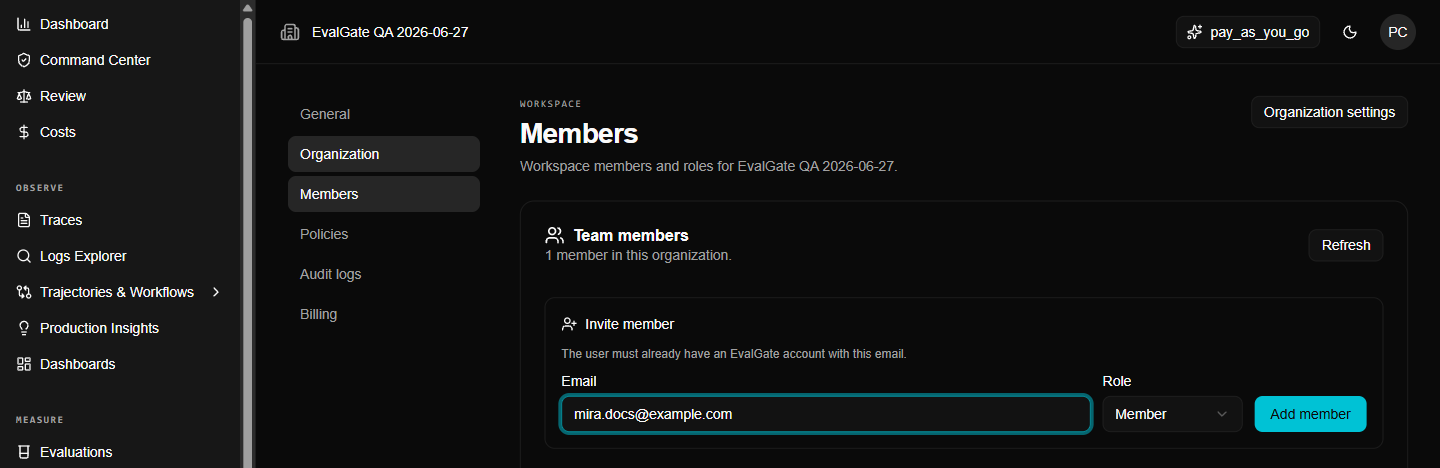 ## Step 2 — Invite
1. Click **Invite**.
2. Enter the email address.
3. Pick a role: **Member**, **Admin**, or a custom role if your plan allows.
4. Send the invite.
The invitee receives an email and joins the organization when they accept.
## Step 3 — Set permissions
Roles map to permission scopes. The common ones:
| Scope | What it allows |
| -------------------------- | --------------------------------------------------------- |
| `eval:read` / `eval:write` | Read and change evaluations, cases, prompts, scorers |
| `traces:read` | Read traces and logs |
| `runs:write` | Enqueue and cancel runs |
| `prompt:publish` | Approve and publish prompt versions |
| `scorer:publish` | Approve and publish scorer versions |
| `admin:org` | Organization admin: members, raw export, runner lifecycle |
Most actions require the matching write scope. A member can read an evaluation
but cannot run it without `runs:write`.
## Step 4 — Remove or change a member
Open a member and change their role or remove them. Removal is immediate and is
recorded in the audit trail.
## Up next
[Manage API keys](./manage-keys) for programmatic access.
## Step 2 — Invite
1. Click **Invite**.
2. Enter the email address.
3. Pick a role: **Member**, **Admin**, or a custom role if your plan allows.
4. Send the invite.
The invitee receives an email and joins the organization when they accept.
## Step 3 — Set permissions
Roles map to permission scopes. The common ones:
| Scope | What it allows |
| -------------------------- | --------------------------------------------------------- |
| `eval:read` / `eval:write` | Read and change evaluations, cases, prompts, scorers |
| `traces:read` | Read traces and logs |
| `runs:write` | Enqueue and cancel runs |
| `prompt:publish` | Approve and publish prompt versions |
| `scorer:publish` | Approve and publish scorer versions |
| `admin:org` | Organization admin: members, raw export, runner lifecycle |
Most actions require the matching write scope. A member can read an evaluation
but cannot run it without `runs:write`.
## Step 4 — Remove or change a member
Open a member and change their role or remove them. Removal is immediate and is
recorded in the audit trail.
## Up next
[Manage API keys](./manage-keys) for programmatic access.